Multiple Faces Detected


 June 7th, 2025
Session hijacking is one of the most overlooked yet effective techniques cybercriminals use to bypass authentication entirely. By stealing or manipulating session tokens, attackers can impersonate logged-in users and gain full access to private accounts.
Unlike brute-force logins or malware, this method leaves no broken passwords behind, only a quiet breach that appears as normal activity.
A 2024 report by Imperva identifies session hijacking as a leading tactic in web application attacks, often carried out through cross-site scripting (XSS) or man-in-the-middle (MITM) vulnerabilities.
This article explains how session hijacking works, the tactics employed, and the steps both users and developers can take to defend against it.
What Is Session Hijacking?
When a user logs into a website, the server creates a temporary session to keep them authenticated, which is typically tracked by a session token stored in their browser.
Session hijacking occurs when an attacker steals or mimics a token to take over a session. Instead of breaking in with a password, the attacker slips in by copying the digital key that proves the user is already logged in.
Many of these attacks end with the victim losing access to their social media, often without realizing how it happened. Instagram accounts, for example, are commonly compromised through methods that involve session theft, phishing, or weak app security.
It’s a stealthy, fast, and often invisible attack that can occur until it’s too late, making it one of the most effective tools in a hacker’s arsenal.
How Session Hijacking Works
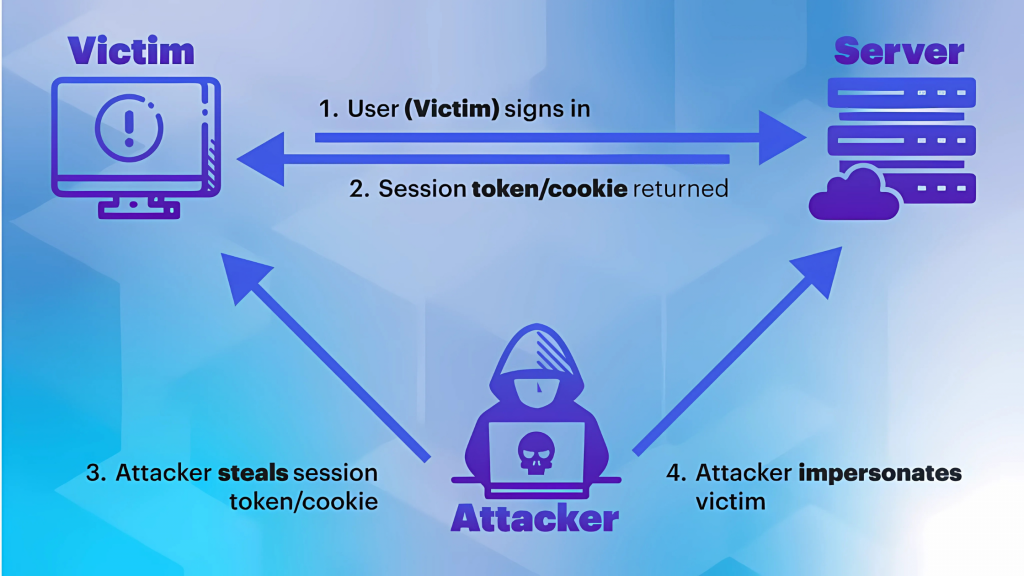
Session hijacking works by exploiting how websites maintain user logins. Here’s how a typical attack unfolds:
- A user logs into a website and gets authenticated.
- The server creates a session ID and stores it as a cookie in the user’s browser.
- If that session ID is exposed, either through interception or guesswork, an attacker can obtain it.
- With that token, the attacker impersonates the user and gains access to their account.
Since the system trusts the session ID, the attacker doesn’t need to know the user’s password. They simply continue the session as if nothing is wrong.
Most session hijacking attacks exploit weaknesses in the protection of sessions. These are the most common ways attackers gain access:
- Unencrypted connections (HTTP): If the website doesn’t use HTTPS, session data can be intercepted during transit.
- Public Wi-Fi networks: Public networks make it easy for attackers to intercept traffic and capture session tokens.
- Poorly secured apps: Apps that don’t properly protect or rotate session IDs are easier targets.
- Browser vulnerabilities: Flaws in the browser or malicious extensions can expose cookies to unauthorized access.
Each of these entry points creates an opportunity for a session hijack, often without the victim ever realizing it.
Types of Session Hijacking Attacks
Session hijacking can take many forms, each rooted in the same fundamental flaw: token-based access that can be intercepted or exploited. These methods are frequently employed in broader cyberattacks that target both web platforms and personal devices.
Session Fixation
In a session fixation attack, the attacker creates or obtains a valid session ID ahead of time and then tricks the victim into using it. Once the victim logs in using that fixed ID, the attacker can hijack the session.
This often happens through a malicious login link, a fraudulent email, or a vulnerable redirect. Since the session ID was already known to the attacker, they simply wait for the victim to authenticate it.
Session Sidejacking (Packet Sniffing)
Sidejacking involves intercepting unencrypted network traffic to steal session data, particularly session cookies. This technique is most effective on open Wi-Fi networks or websites that don’t use HTTPS.
Once the attacker captures the cookie, they can replay it to take over the user’s active session, often without detection.
Cross-site Scripting (XSS) Exploits
XSS attacks inject malicious JavaScript into a web page that runs in the user’s browser. If the app doesn’t sanitize inputs, the script can steal session cookies and send them to the attacker.
It’s one of the most common ways session data is exposed. Attackers often hide the script behind fake profiles or images. A quick Reverse Image Lookup by Social Catfish can help you verify if the image is associated with other scams or counterfeit identities.
Man-in-the-Middle (MITM) Attacks
In a MITM attack, a cybercriminal secretly positions themselves between the user and the server, intercepting all data exchanged in real time. This can include login credentials, session tokens, and other sensitive information.
MITM attacks are especially dangerous on unsecured networks or when encryption is weak or improperly configured.
Malware-based Hijacking
Some attackers bypass the network altogether by using malware on the user’s device. A Trojan, keylogger, or browser exploit can capture session tokens directly from memory or the browser itself.
Once stolen, these tokens allow the attacker to impersonate the user from anywhere, without needing access to the victim’s network.
This method is also used as a gateway for scammers to gain access to bank account information, especially when the hijacked session involves financial apps or online banking portals.
How to Prevent Session Hijacking
While session hijacking can be difficult to detect once it has occurred, there are practical ways to mitigate the risk and manage secure platforms.
- Use only secure HTTPS connections: Always check that the website uses HTTPS before logging in. This ensures your session data is encrypted while it travels between your device and the server.
- Avoid public Wi-Fi or use a VPN: Public networks are a common hunting ground for attackers. If you need to connect, use a trusted VPN to encrypt all your traffic and protect your session tokens from being intercepted.
- Enable 2FA for all logins: Two-factor authentication adds an extra layer of protection. Even if someone hijacks your session, 2FA can block them from making high-risk changes, such as password resets or financial transfers.
- Clear cookies after using shared devices: If you log in on a public or shared computer, clear your cookies and browser data afterward. This removes stored session tokens that could be misused later.
- Log out fully from sessions: Don’t just close the browser tab. Use the platform’s official log-out button to end your session properly and invalidate the token stored on the server.
What to Do If You Suspect You’ve Been Hijacked

Signs like sudden logouts, account changes you didn’t make, or unfamiliar activity should never be ignored. Act fast by logging out of all sessions, changing your passwords, clearing browser cookies, and scanning your device for malware or spyware.
In more complex cases, especially when someone has impersonated you, accessed private messages, or caused real damage, getting expert help can make all the difference.
At Social Catfish, our team of search specialists is here to help you trace digital footprints, uncover who’s behind the hijack, and give you the tools to take back control, confidently and safely.
One of our users shared this experience:
“Erin was courteous and professional, reaching out to me and sending a follow up email regarding pricing options. Highly recommend this site especially for searches of people across all social media with contact details.” – TS Wolff