

 Multiple Faces Detected


 December 10th, 2022
There are many reasons you might want to find someone using a photo, and the good news is that if all you have available to you is an image of that person, you can still find them. If you have a photo and want to see the origin and the person shown in the picture, then you can use reverse image search and a variety of other ways to find who’s in the photo. You can find a name to match the face and the best news is that it’s easier than you could have expected. You can find their full name, birth date, employment, and marital status. A reverse image search is one of the best and easiest ways to find someone by picture. Reverse image search has been available and used for a long time and has become quite popular.
Reverse image search allows you to take one image, and from there, you can find the identity of someone and other similar images. This is a handy tool for people currently using online dating apps and are wary about suspicious activity with whom they’re chatting. If you think they might be using a fake identity, then you can reverse image search to find their real identity and ensure they are who they say they are.
If you’re in this situation, then you might be wondering exactly how you can do a reverse image search and other methods that you can use to find the real identity of someone. The good news is that we can give you the exact steps to do a reverse image search and other methods you can use if that doesn’t work.
Google Reverse Image Search and How To Do It
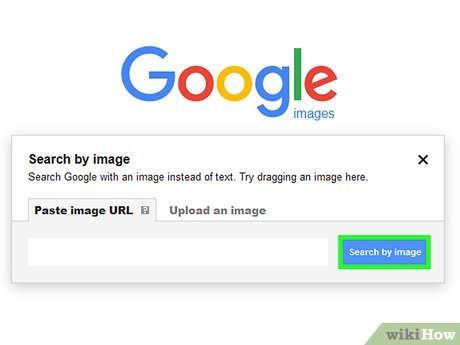
Google reverse image search allows you to quickly find the source of an image with just a few simple steps and ultimately find someone’s identity and essential details about them. Using an image to find someone is the easiest and the most simplistic method you’ll find. It requires only a few basic steps, and you can easily find exactly what you’re looking for on the internet. Google reverse image search works precisely as it does with words, except that you’re using an image instead of typing. We’ve laid out the basic steps below:
- Find the image. The process starts with finding the right image you want to search with, and then Google will provide you with a similar or the same image so that you can identify where it originated from. If you’re looking at ways to use Google reverse image search, you already have the image you’ll use; now it’s just a matter of uploading it. There are two ways you can use your picture; the first is that you can use the image’s URL and the second is that you can upload images that have been saved to your computer. Finding an image’s URL address is easy––you just right-click the image and select the option to copy the URL.
- Google images. The next step that you’ll take to upload your image is to go to Google images and click on the camera icon. From there, you either upload your photo or paste the image URL, and click the option to search. If you’re using your Google Chrome browser, then it’s as easy as right-clicking on a search image with Google Lens.
- Look at your results. After you search for your images, Google will offer you a vast range of images to examine. The search results will be displayed, and if Google has found the same image in other sizes, these results will be shown at the top. At the bottom of the page visually similar results will be shown, and it’ll also show you where you can find the same image.
Find Their Facebook Profile

If you’re still looking for the results you hoped for with Google reverse image search then there’s one more option that you can use. This way is a bit harder and can be more complicated, but it’s worth it if you find the right results through this method. Although not easy, finding a Facebook profile can give the most information about someone and is usually a helpful step in identifying them. The steps for finding someone’s Facebook profile through an image are outlined below.
- File name. The first step in this process is to look at the image’s file name. Typically you’ll find this if you right-click on the image and select the option to view the image. Usually, the file name will end with .png or .jpg, and this is what you’re looking for. If the image is from Facebook, you’ll be able to tell by the letters “fb,” usually identifiable towards the beginning of the file name.
- Locate the middle number. This is where things get a bit tricky, but the next thing that you’ll do is try to identify the middle number of the file name. Usually, the file name will have three letters separated with some punctuation. These sets will be relatively long, and the one that you’re looking to locate is the middle set of numbers. Why this number? This is the profile ID from the Facebook user’s profile and it can always be longer or shorter depending on the exact profile.
- Search for the profile. Next, you will search for the profile by copying and pasting this address into your browser: https://www.facebook.com/photo.php?fbid=
- Paste your numbers. The next step will be to paste your middle numbers at the end of the above address without including a space at the end. If you go to that address, you should see that Facebook profile pop up immediately! You’ll see the Facebook profile associated with the image, and from there, you can learn all the necessary information about that person.
What Is the Best Way To Find Someone By Picture?
These are only two of the ways that you can find someone online and learn information about them by simply using a photo, so with all the options available, you might be wondering which one is the best. The truth is that there is no best way to find someone with an image; there are multiple ways, and it depends on your image and what you’re searching for to decide which one to use. We suggest using Google reverse image search, and if you don’t find the results that you’re looking for through that method, you can search for their Facebook profile through an image. Above, we show both ways and how you can find someone and their identity through one picture!











