Multiple Faces Detected



 October 2nd, 2025
Online scams are growing at an alarming pace. According to the FBI’s Internet Crime Complaint Center (IC3), Americans reported more than $12.5 billion in losses to internet fraud in 2024, and the numbers continue to rise each year (FBI IC3 Report). The Federal Trade Commission (FTC) echoes this trend, noting that millions of people fall victim annually, with scams ranging from romance fraud to investment schemes.
For everyday people, the impact isn’t just financial, it’s emotional. Victims often describe feeling confused, embarrassed, and unsure of who to trust online. That’s why it’s more important than ever to know the warning signs and take steps to protect yourself.
In this guide, you’ll find 10 proven, practical tips to stay safe online and prevent scams before they happen.
Worried about an online scam? Run a quick reverse search with Social Catfish to confirm who you’re really talking to.
Recognizing Common Online Scam Red Flags
Scammers often follow predictable patterns, and one of the biggest warning signs is when you’re asked for personal information like your Social Security number, bank account details, or passwords. Legitimate organizations rarely request sensitive data through email, text, or social media. If you’re pressured to share private details without a valid reason, consider it a red flag and take a step back.
Refusal to Meet in Person or Video Chat – Avoiding face-to-face interaction is a major red flag, especially in online relationships.
Unsolicited Contact – Unexpected emails, calls, or messages from strangers claiming urgent news, investment opportunities, or personal interest.
Pressure for Immediate Action – Scammers often push you to “act now” before you have time to think or verify.
Requests for Money or Gift Cards – Whether framed as emergencies, investments, or prizes, legitimate organizations and real people don’t ask for gift cards or wire transfers.
Poor Grammar or Misspelled Domains – Look for awkward phrasing, spelling mistakes, or email addresses that mimic real companies but aren’t exact matches.
Strengthening Your Digital Defenses: Secure Practices and Tools
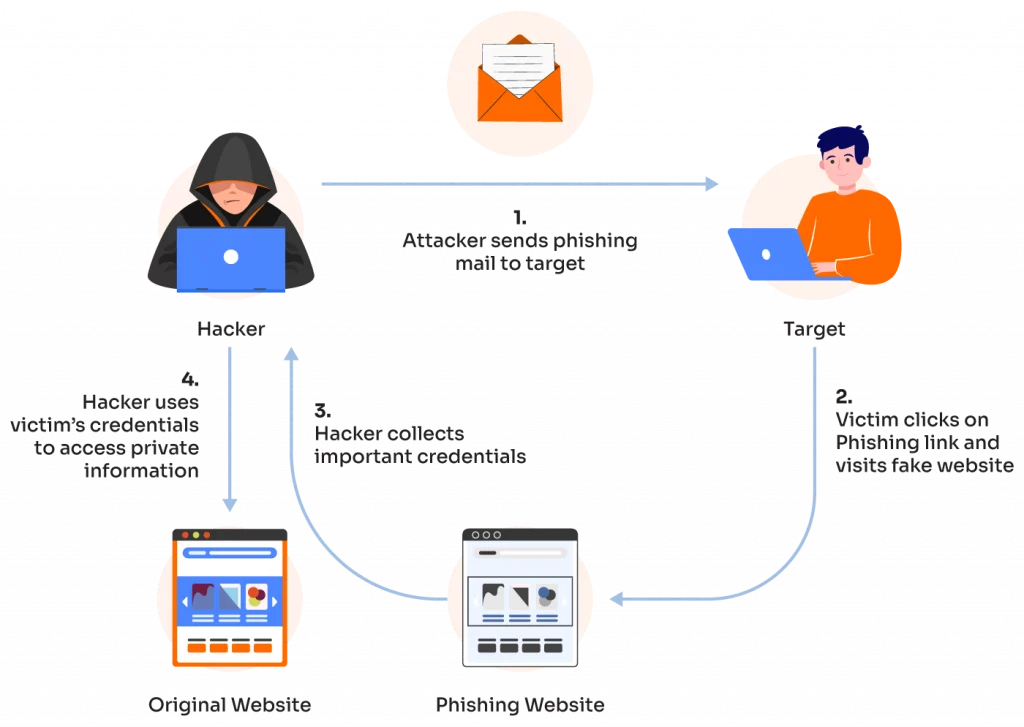
Scammers are getting smarter, but so can you. These 10 prevention strategies are straightforward to implement and can make a significant difference in protecting your online safety.
1. Use strong, unique passwords and a password manager
Using a strong, unique password for each account prevents a single data breach from compromising all of your online services. A password manager helps you securely store and manage these complex passwords, so you don’t have to remember them all.
2. Enable multi-factor authentication everywhere
Multi-factor authentication (MFA) adds an extra layer of security, requiring a second form of verification (like a code from your phone) in addition to your password. This makes it significantly harder for scammers to access your accounts, even if they have your password.
3. Be cautious with links and attachments
Scammers often use malicious links or attachments in emails and text messages to install malware or steal your information. Being cautious and only clicking on links from trusted sources protects your devices and data from these threats.
4. Verify identities with reverse searches (image, phone, email)
Scammers often create fake online profiles or use stolen identities to deceive you. A reverse search of their image, phone number, or email can help you verify their authenticity and expose a fraudulent account before you engage with them further.
5. Avoid oversharing personal info on social media
Oversharing personal details like your birthday, hometown, or family members’ names on social media gives scammers information they can use to create convincing phishing schemes or answer security questions to access your accounts. Limiting what you share online reduces your risk of being targeted.
6. Regularly update devices and software
Software updates often include security patches that fix vulnerabilities scammers could exploit. Regularly updating your devices and applications ensures you have the latest protections against new and emerging threats.
7. Use call-blocking and spam filters
Spam calls and emails are common methods scammers use to initiate contact. Using call-blocking apps and keeping your email’s spam filter active can prevent many of these fraudulent attempts from ever reaching you, saving you time and reducing your exposure to scams.
8. Watch for payment red flags (gift cards, wire transfers)
Scammers often request payment through unconventional and irreversible methods like gift cards, cryptocurrency, or wire transfers. Being wary of these payment methods helps you avoid losing money in a way that is difficult or impossible to recover.
9. Secure your home Wi-Fi network
An unsecured Wi-Fi network can be an entry point for cybercriminals to access your devices. Securing your network with a strong password and encryption (WPA3 or WPA2) protects your online activity and connected devices from unauthorized access.
10. Educate yourself and loved ones
Scammers’ techniques are constantly evolving. Staying informed about new scams and sharing this knowledge with family and friends empowers everyone to recognize and resist fraudulent attempts, creating a stronger defense for your entire community.
How to Protect Yourself If You Suspect a Scam
If you start to feel uneasy about an online interaction, it’s important to act quickly. Here are the key steps to take
Save Evidence (Screenshots, Messages) – Keeping a record protects you legally and can help investigators piece together the scammer’s tactics.
Stop Contact Immediately – End communication with the suspected scammer to prevent further manipulation or pressure.
Do Not Send Money or Personal Details – Even small amounts or seemingly harmless information can be exploited for bigger fraud.
Run a Reverse Lookup to Verify Identity – Use tools like Social Catfish to search their photo, email, phone, or username and see if they’re connected to known scams.
Report to the FTC, IC3, or Local Authorities – Official reports help track scammers, warn others, and may support future investigations.
If you think you may already be a target, run a scam check with Social Catfish to confirm suspicions and protect yourself before it’s too late.
Long-Term Protection & Resources
Protecting yourself online isn’t a one-time task—it requires ongoing vigilance and the right tools at your disposal. By establishing a routine of digital safety practices and knowing where to turn for help, you can maintain your long-term security.
Social Catfish Security Suite
Social Catfish offers comprehensive tools designed to keep you protected across multiple fronts:
- Reverse Image Search: Upload suspicious photos to verify their authenticity and discover if they’re being used elsewhere online
- People Search: Find all data points related to a name, including phone number, email, address, social media profiles, family & associates, criminal records, etc.
- Reverse Email Lookup: Investigate unfamiliar email addresses to uncover associated profiles and verify sender identity
- Phone Number Verification: Check unknown numbers for legitimacy before engaging with callers or text messages
- Address Lookup: Find property summary & owner information, verify listing authenticity, and check safety issues such as sex offenders in the neighborhood
- Social Media Cross-Reference: Search across platforms to verify if profiles match claimed identities
When automated tools aren’t enough, Social Catfish’s Search Specialists are certified investigators with over 9 years of experience that can help:
- Conduct deep investigations into suspicious individuals or situations
- Verify complex catfish scenarios with professional analysis
- Provide detailed reports on potential scammers or fraudulent profiles
- Offer personalized guidance for unique or challenging cases
Additional Resources for Comprehensive Protection
- Federal Trade Commission (FTC): Report identity theft and consumer fraud
- FBI’s IC3 (Internet Crime Complaint Center): File reports for internet-related crimes
- Local Law Enforcement: For immediate physical threats or harassment
- Platform-Specific Reporting: Use built-in reporting tools on social media sites
Remember: Your online safety is an investment in your peace of mind. By maintaining these protective measures and keeping this resource readily available, you’re building a strong foundation for long-term digital security. Regular use of these tools and practices will help ensure that you can enjoy the benefits of online connection while minimizing the risks.
FAQs
What are the top 5 most common types of online scam today? Phishing/spoofing, extortion, personal data breach, non-payment/non-delivery, and investment scams are currently the most prevalent, with criminals leveraging the Internet or other technology to commit fraudulent activities, often involving the theft of money, data, or identity, or the creation of counterfeit goods or services.
Can scammers use my social media photos? Yes, scammers frequently steal photos from social media accounts to create fake profiles on dating sites, social platforms, and business networks. This is called catfishing.
How do I check if a stranger online is real? Use reverse image searches on their photos, verify their social media presence across multiple platforms, and ask for video calls. Be suspicious of profiles with limited photos or recent creation dates.
What should I do if I already sent money to a scammer? Contact your bank immediately to report fraud, file a complaint with the FTC and FBI’s IC3, document all communications with the scammer, and consider consulting Social Catfish for investigation help.
Are scam prevention tools free? Basic tools like reverse image searches and social media checks are often free, but comprehensive monitoring services and professional investigations typically require paid subscriptions for full protection.
Conclusion
Online safety isn’t complicated when you have the right tools and knowledge. By staying alert to warning signs, verifying new connections, and using protective services like Social Catfish, you can enjoy digital relationships with confidence. Remember to trust your instincts and never hesitate to investigate suspicious behavior. Your security is worth the extra step of verification.