Multiple Faces Detected


 December 30th, 2024
- Step-by-Step Guide to Clearing All Passwords from Google Password Manager
Step-by-Step Guide to Clearing All Passwords from Google Password Manager
Our day-to-day activities are highly dependent on the digital world. Financial transactions, medical appointments, job applications, and even entertainment are found online. It is both convenient and reliable. But on the flip side, knowing how to delete all passwords Google Password Manager can help protect your information from privacy compromises and fraud risks.
One way to protect your information against this risk is by using unique passwords. Everyone has a password to their private information like phone numbers financial details and personal accounts. However, there is also another problem. Being a compulsory requirement in the age we live in, an average person has multiple passwords to remember. Many of them try to take a shorter route by reusing them, compromising security in the process.
Criminals know that the only stumbling block to getting your information is a password. They, therefore, steal or crack them. The lower your effort is in protecting your password, the easier it is for them to crack. Luckily, there is a management tool, such as Google Password Manager, that helps you create unique passwords, and store them securely in one place. Even if cybercriminals get a hold of them it notifies you immediately. It also prompts you to take action by either changing the password or cleaning up completely.
Methodology
- This article presents information about how to delete all passwords on Google Password Manager and secure your online accounts. We gathered insights from different relevant and credible platforms and integrated them to create a detailed and informative article.
- We analyzed Kaspersky’s insights on how to start the year with an online clean-up including changing weak passwords. We also used information from Google, highlighting the role of Google Password Manager in protecting your passwords.
- Similarly, we also used Google Password Manager’s platform to provide information about its work regarding the storage of passwords and how consumers can access them. Using ideas from the United States Credit Federal Union, we offered information about the risks of losing your password such as customer account takeover. Lastly, we analyzed FTC’s insights on the need to delete your passwords to protect your personal information.
Key Takeaways
- According to Google Password Manager, every 4 out of 10 Americans have reported an online compromise of personal information by malicious actors. This record calls for the use of strong password managers. They create strong passwords and store them safely. The advantage of this strategy is that it synchronizes the passwords in all your devices.
- Unfortunately, some people use weak passwords or use the same on different platforms. Attackers then easily breach them and access your accounts. They can use them to fake identity or use the information for fraudulent crimes.
- If you notice attackers have compromised your passwords, you need to delete them immediately. Fortunately, if you use Google Password Manager, they are all saved in the same place, making it easy to delete instead of having to visit each platform one by one.
How Google Password Manager Works

Google Password Manager makes the concept of having unique and strong passwords possible. First, it suggests strong passwords for a new platform you create in your Google account. Additionally, it saves the password, so you do not have to remember it next time you want to log in. Using its built-in security, it encrypts the password making it hard for attackers to read or use it. As a result, it improves your online security.
One common way in which passwords are compromised is when hackers steal them. Google Password Manager combats this by ensuring you get a notification any time your account is accessed or your password is published on the internet. It goes further to create a platform for you to change it. Lastly, you can add another security layer in the form of recovery information or a 2-step verification.
Tactics Hackers Use to Obtain Your Passwords
Hackers have devised strategies to get your passwords. They use social engineering to trick you. Although they are known to utilize unlimited methods, the most common ones are as follows.
I). Phishing
Phishing is the most common way attackers get your passwords. They masquerade as legitimate entities such as family, friends, or an organization you do business with like PayPal or Netflix. They send a message with a link or an attachment. These might require you to use your personal information or might have malicious software that steals your information. When you fail to identify them, you might end up giving up your information or downloading malware on your device, compromising your password.
II). Malware
Another way hackers can get your passwords is by malvertising or drive-by-downloading. These terms refer to when you click on a malicious advertisement or visit an infected website, respectively. Additionally, malware can also be integrated into a messaging mobile app that looks legitimate. However, you can identify these apps as they are often found on third-party app stores with malicious links.
III). Brute forcing
Hackers can get your password by using trial and error to crack it. It is a simple tactic that hackers use considering people are likely to use simple passwords that can be easily remembered. According to research, an average person is required to manage 25% more passwords annually since 2020. One common type of brute forcing that scammers like to use is credential stuffing. It involves using automated software to feed many breached usernames and passwords into multiple sites to find a match. If you use the same password across multiple accounts, they can unlock all of them.
What can a hacker do with my password?

Passwords act as keys to your online world. They give access to your social media accounts, online banking platforms, email, entertainment platforms like Netflix and Spotify, and other online service platforms. All these services need payment and offer you certain benefits. Scammers, therefore, know this and want to take advantage of the services without working for it. As a result, they can use your password to:
a). Steal your identity
According to the identity scam report, scammers can use your password to take over your online accounts. After that, they can use the accounts to benefit themselves by masquerading as you. For instance, they can order free rides on Uber, stream movies on Netflix, or make unauthorized purchases using their banking accounts. In addition, they can use it to access your information and commit fraudulent crimes.
For instance, scammers can create new credit accounts in your name and use them to apply for loans, leaving you with debt. They might even open bank accounts under your identity to launder money or impersonate you to solicit money from your friends and family. In such cases, services like Social Catfish can help uncover the perpetrators behind these schemes. Our team specializes in tracking digital footprints and identifying hidden identities, helping you take steps to protect your finances and restore your reputation. Don’t let scammers take control—consider reaching out for expert assistance.
b). Sell your information to other criminals
Criminals know the value of data. They are willing to spend millions of data to obtain personal information. Earlier this year, USDoD, a criminal organization, attempted to sell peoples’ SSNs and other personally identifiable information (PII) on the dark web for about $13 million. They can use personal data for a wide range of crimes including identity theft, cyberbullying, account takeovers, and blackmail among others.
How to Delete All Passwords Using Google Password Manager
Note that these steps will delete your saved passwords permanently and you will not be able to restore them.
On a desktop device:
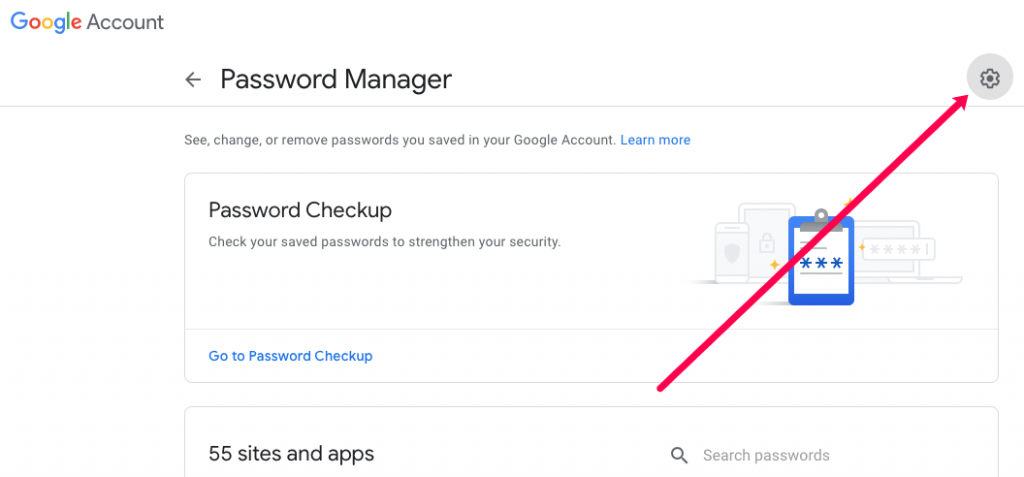
Open Google Chrome
Tap the three dots at the top right corner of the screen and select “Settings”.
Locate “Autofill and passwords” and click “Google Password Manager”.
You can see a list of your saved passwords.
Select the passwords that you want to delete by checking the boxes beside them and clicking “Delete”.
On your Android or iOS device:
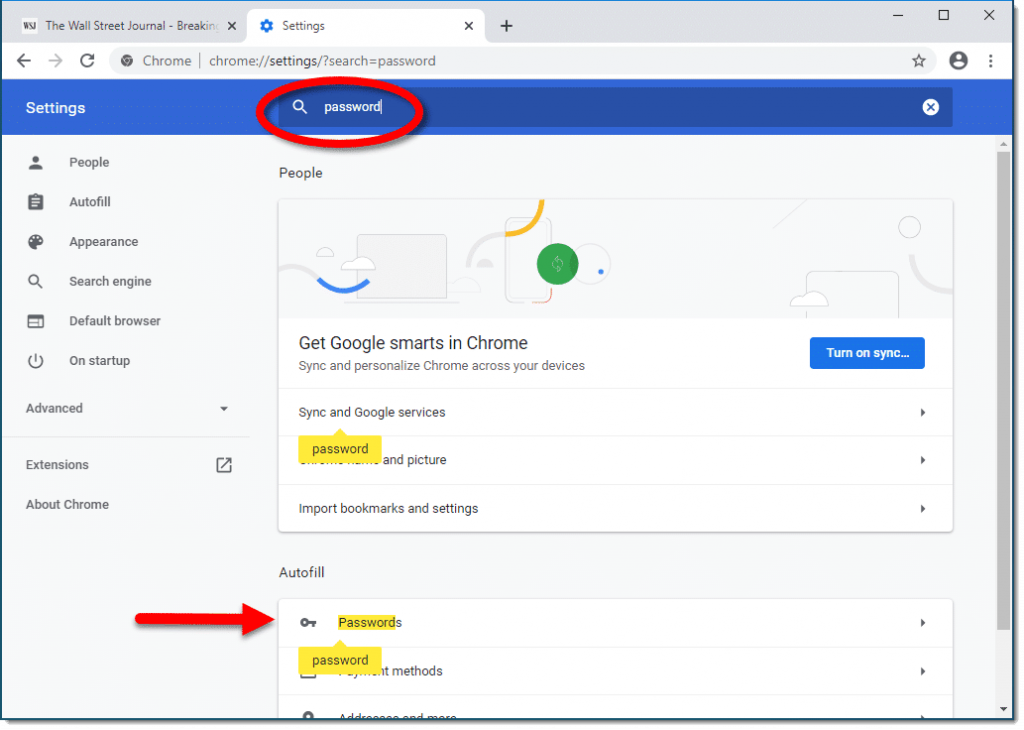
Open Google Chrome
Tap the three dots at the top right corner of your Android, or the bottom right corner of your iOS device.
Select “Settings” and click on “Password Manager” (You might be required to verify your identity).
A list of your saved passwords will appear.
You can select the passwords you want to delete by checking the boxes beside them to bulk delete.
The Bottom Line: How to Delete All Passwords Google Password Manager
The advancements in technology make it nearly impossible to avoid the digital world. With numerous accounts to manage, many wonder how to delete all passwords Google Password Manager stores to start fresh. To simplify password management, people often reuse the same characters across multiple accounts, risking security for convenience.
Google Password Manager makes it easier to generate and store passwords securely. However, in some cases, scammers may gain access to your information and use it maliciously. If you suspect that your passwords have been compromised, the first step is to delete all your accounts.
Fortunately, Google Password Manager keeps all your passwords in one place, making this process more manageable. If you need additional help investigating and recovering your compromised information, Social Catfish offers expert services to help uncover the truth and protect your online security.