Multiple Faces Detected


 October 22nd, 2025
You need to convert a Word doc to a PDF. Quick Google search. Click the first result. Upload your file. Download the converted version. Done.
But something’s wrong.
Your computer starts acting weird. Files are locked. Or worse, your bank account gets drained a week later. You just fell for one of the fastest-growing scams online: fake online file converter scams.
The FBI recently issued a warning about these malicious tools. They’re everywhere. And they’re designed to look completely legitimate. These fake online file converter scams don’t just convert your files. They install malware, steal your personal information, and can even lock your entire system with ransomware.
Here’s what you need to know.
What Are Fake Online File Converter Scams?
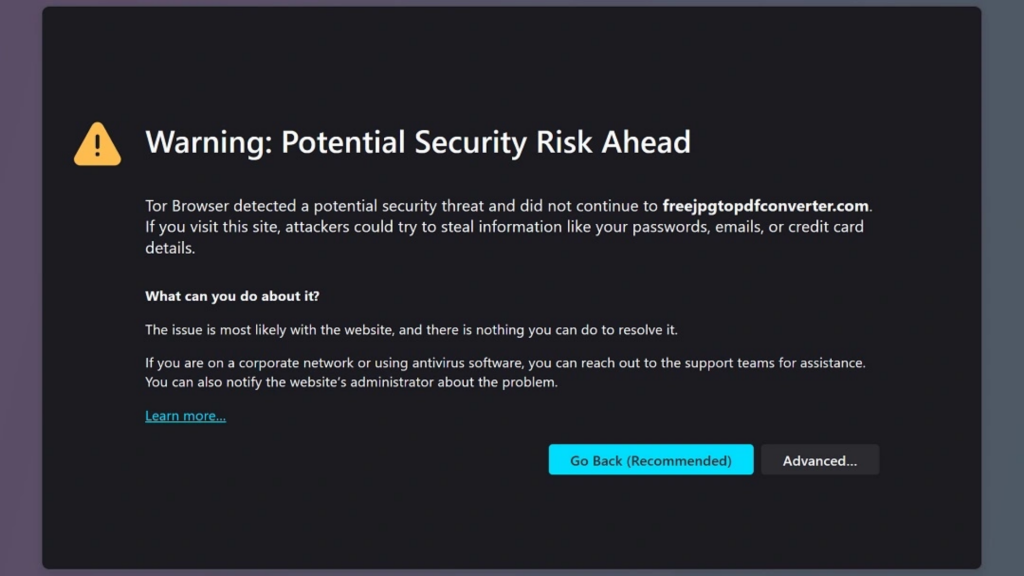
Fake online file converter scams are websites that promise free file conversion services. They claim to turn your .doc files into PDFs, combine multiple images into one document, or download MP3s and MP4s from the web.
The tools actually work. That’s the scary part.
You upload your file. The site converts it. You download the result. Everything seems fine. But hidden inside that converted file is malware. Or the site scrapes your uploaded document for sensitive data like Social Security numbers, bank account details, passwords, and cryptocurrency wallet information.
Cybercriminals use several tactics. Some sites trick you into downloading a “converter tool” that’s actually malware. Others push browser extensions that hijack your searches and flood you with ads. The most sophisticated ones embed malicious code directly into the converted file itself.
Most victims don’t realize they’ve been infected until it’s too late. Your computer might be locked by ransomware. Your identity could be stolen. Or your crypto wallet is empty.
How These Scams Actually Work
Fake online file converter scams operate in a few different ways. Understanding the methods helps you spot them.
Method 1: Malicious Downloads
You visit a converter site. It tells you to download a small program to complete the conversion. That program is malware. Once installed, it gives hackers remote access to your computer. They can steal files, log your keystrokes, and install ransomware.
Sites like docu-flex[.]com and pdfixers[.]com used this method, according to cybersecurity researchers. Both distributed Windows executables that were flagged as malware.
Method 2: Browser Extensions
Some fake converters recommend installing a browser extension “for faster conversions.” These extensions are often browser hijackers. They change your homepage, redirect your searches, and track everything you do online. They also serve up endless ads and can steal your login credentials.
Method 3: Infected Files
This is the most dangerous method. The converter works perfectly. You get your PDF or combined image file. But hidden inside is malicious code. When you open the file, it downloads an information stealer onto your device. Everyone who opens that file gets infected.
Method 4: Data Scraping
Even if the site doesn’t install malware, it can still steal your information. When you upload a document, the site scans it for valuable data. Tax forms, medical records, and financial statements. Anything with personal identifying information becomes a goldmine for scammers.
The FBI warns that these tools scrape for Social Security numbers, dates of birth, phone numbers, banking information, cryptocurrency seed phrases, wallet addresses, email addresses, and passwords.
Red Flags to Watch For
Not all file converters are scams. But fake online file converter scams share common warning signs.
Suspicious URLs. Scammers create URLs that look almost legitimate. They might change one letter or use “INC” instead of “CO.” Always double-check the domain name before uploading anything.
Too many ads. Legitimate converter sites might have some ads. Scam sites are drowning in them. Pop-ups, redirects, and aggressive advertising are major red flags.
Requests to download software. Most legitimate online converters work entirely in your browser. If a site asks you to download a program or install an extension, be suspicious.
No company information. Check the “About” page. Scam sites often have vague or missing contact information. No physical address, no phone number, no real company details.
Pressure tactics. “Download now before time runs out!” Legitimate services don’t rush you. Scammers do.
Poor grammar and spelling. Many of these sites are created quickly by overseas scammers. Look for obvious errors in the text.
If you’re unsure about someone you’ve met online or suspect you’re dealing with a scammer, tools like Social Catfish’s reverse image search can help verify their identity. You can also use a reverse phone lookup if they’ve given you a number, or check their email with a reverse email address search.
Real-World Examples
These aren’t theoretical threats. Real people and businesses have been hit hard by fake online file converter scams.
In February 2025, Lee Enterprises, a media company operating in over 70 markets, suffered a ransomware attack. Preliminary investigations suggest the attack may have originated from a fake file converter tool. The company’s systems were encrypted, files were stolen, and operations were disrupted for weeks.
The FBI Denver Field Office reported seeing an increasing number of these scams throughout 2025. One public sector entity in metro Denver reported falling victim within a three-week period.
Cybersecurity researcher Will Thomas identified multiple malicious converter sites, including imageconvertors[.]com, convertitoremp3[.]it, convertisseurs-pdf[.]com, and convertscloud[.]com. All were flagged for distributing malware, adware, or phishing attacks.
In another case documented by researchers, a fake converter site was used to spread Gootloader malware. Victims thought they were converting PDFs to Word documents. Instead, they downloaded a JavaScript file that installed banking trojans, infostealers, and tools that allowed hackers to take over entire corporate networks.
These attacks have led to full-blown ransomware incidents. Companies like REvil and BlackSuit have used similar tactics to breach networks and demand millions in ransom payments.
What Happens If You’re Infected
The consequences of fake online file converter scams vary depending on the type of malware installed.
Ransomware. Your files get encrypted. You can’t access anything on your computer. A ransom note appears demanding payment, usually in cryptocurrency. Even if you pay, there’s no guarantee you’ll get your files back.
Identity theft. Scammers use your stolen information to open credit cards, take out loans, or file fraudulent tax returns in your name. You might not discover the theft until debt collectors start calling.
Financial loss. If the malware captures your banking credentials or cryptocurrency wallet information, your accounts can be drained within hours.
Data breaches. If you’re infected at work, the malware can spread across your company’s network. This can lead to massive data breaches affecting thousands of people.
Ongoing surveillance. Some malware stays hidden on your device for months, quietly logging everything you type and every site you visit. Hackers build detailed profiles of your online life.
If you suspect you’ve been targeted by a scammer, Social Catfish can help you investigate. Whether it’s a romance scammer, someone using fake video chat, or a suspicious profile on a dating site, Social Catfish’s tools can uncover the truth. You can search for hidden profiles on social networks or run a dating profile search to see if someone is who they claim to be.
How to Protect Yourself

Avoiding fake online file converter scams requires vigilance and smart online habits.
Use trusted tools. Stick with well-known, reputable file converters. Adobe, Microsoft, and Google all offer legitimate conversion tools. If you’re not sure about a site, don’t use it.
Keep your antivirus updated. Modern antivirus software can detect and block many of these threats. Make sure it’s running and up to date.
Scan downloaded files. Before opening any file you’ve downloaded, scan it with your antivirus software. This can catch malware before it infects your system.
Don’t upload sensitive documents. Never upload tax forms, medical records, financial statements, or anything with personal information to an unknown converter site.
Check reviews. Before using any online tool, search for reviews. If it’s a scam, someone has probably reported it.
Use browser security extensions. Tools like Malwarebytes Browser Guard can block malicious sites before you even visit them.
Be skeptical of search results. Scammers pay for ads to appear at the top of search results. Just because a site ranks first doesn’t mean it’s legitimate.
Verify URLs carefully. Look for small changes in domain names. Scammers often register domains that are one letter off from legitimate sites.
If you’re concerned about someone you’ve met online, Social Catfish offers comprehensive background checks. You can find someone on dating sites, check if they’re on multiple dating platforms, or even search for them on Tinder, Bumble, or Hinge.
What to Do If You’ve Been Scammed
If you think you’ve fallen victim to fake online file converter scams, act immediately.
Disconnect from the internet. This prevents malware from spreading or communicating with the hacker’s servers.
Contact your financial institutions. Alert your bank and credit card companies. Freeze your accounts if necessary. Monitor for unauthorized transactions.
Change all passwords. Do this from a clean, trusted device. Don’t use the infected computer.
Run a full antivirus scan. Use updated antivirus software to detect and remove malware. Consider taking your computer to a professional if the infection is severe.
Report the scam. File a report with the FBI’s Internet Crime Complaint Center. This helps authorities track and shut down these operations.
Monitor your credit. Check your credit reports for suspicious activity. Consider placing a fraud alert or credit freeze.
Document everything. Take screenshots of the scam site, save any emails or messages, and keep records of financial losses.
If you’ve been catfished or scammed in a romance scheme, Social Catfish specializes in helping victims. The platform can help you identify catfish scammers, spot 12 signs you might be getting catfished, and take action. Social Catfish has helped thousands of people uncover the truth about suspicious online relationships.
Why Social Catfish Is Your Best Defense
While fake online file converter scams are a growing threat, the bigger picture is about protecting yourself from all types of online fraud.
Social Catfish is the leading platform for verifying online identities and uncovering scams. Whether you’re dealing with a suspicious file converter, a questionable online relationship, or mysterious phone calls, Social Catfish has the tools you need.
Comprehensive search tools. Social Catfish offers reverse image search, phone lookup, email search, and username search. You can verify anyone’s identity across hundreds of platforms and databases.
Scam detection. The platform specializes in identifying romance scammers, catfish, and fraudulent profiles. If someone seems too good to be true, Social Catfish can help you find out.
Expert support. Social Catfish’s team has years of experience helping people navigate online scams. They provide guidance, resources, and support throughout the investigation process.
Proven results. Thousands of people have used Social Catfish to uncover the truth. From finding hidden social media accounts to identifying scam call numbers, the platform delivers real answers.
Don’t wait until you’re a victim. If something feels off about an online interaction, trust your instincts and investigate. Social Catfish makes it easy to verify identities, spot red flags, and protect yourself from scammers.
Stay Safe Online
Fake online file converter scams are just one piece of a much larger puzzle. Cybercriminals are constantly evolving their tactics. They exploit our trust, our need for convenience, and our lack of awareness.
But you don’t have to be a victim.
Stay informed. Question suspicious websites. Use trusted tools. And when in doubt, verify before you click.
If you’re ever unsure about someone you’ve met online or a website you’re considering using, Social Catfish is here to help. With powerful search tools and expert support, you can uncover the truth and protect yourself from scams.
Because in today’s digital world, knowing who you’re dealing with isn’t just smart. It’s essential.