Multiple Faces Detected


 September 22nd, 2023
In a world that’s more interconnected than ever, social media platforms continually evolve to foster meaningful connections. One such innovative feature is Snapchat’s Snap Map, a dynamic tool that allows users to connect with friends and explore shared experiences based on their real-time locations. If you’re curious about harnessing the potential of Snap Map for location-based interactions, this article is your comprehensive guide. Join us as we delve into the exciting world of Snap Map and unveil how it can transform the way you connect and engage with friends in your digital sphere.
Understanding Snap Map: Unveiling Location-Sharing Dynamics
social media platforms continue to evolve, offering innovative ways to engage with friends and loved ones. One such feature that has captured the attention of users is Snapchat’s Snap Map. Designed to enhance social interactions through location-sharing, Snap Map has become a versatile tool for connecting with friends in real-time. But what exactly is Snap Map, and how does it work?
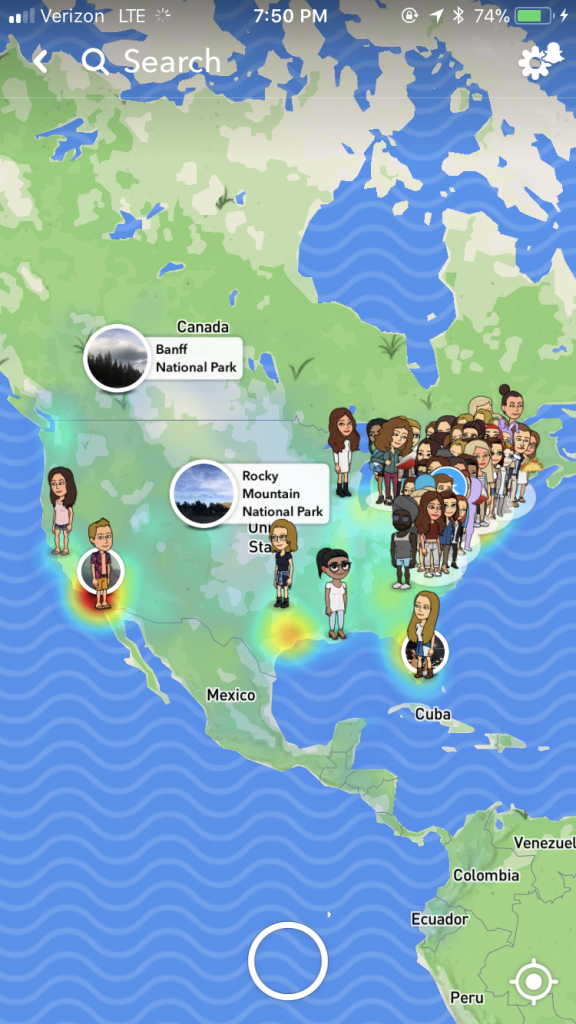
At its core, Snap Map is a location-sharing feature integrated within the Snapchat app. It allows users to share their real-time location with friends on their contact list, enabling them to see where their friends are and what they’re up to. The map displays “Actionmoji” avatars representing users, indicating their current location through location-based services on their devices. These avatars can engage in various activities, such as driving, listening to music, or even sleeping, providing a snapshot of your friends’ moments.
Snap Map’s functionality revolves around three primary modes: Ghost Mode, My Friends, and Explore. Ghost Mode offers the option to share your location with specific friends or not share it at all. This mode empowers users to have control over their privacy while using the feature. The “My Friends” mode displays the locations of friends who have chosen to share their location with you, fostering real-time connections and enabling meet-ups. On the other hand, the “Explore” mode presents public Snaps and Stories from various locations worldwide, allowing users to virtually explore events and activities happening around the world.
This dynamic location-sharing feature brings a new layer of connectivity and spontaneity to social interactions. It allows friends to coordinate plans more efficiently, like meeting up at a concert or discovering that they’re in the same neighborhood. However, it’s important to note that Snap Map’s utility lies in its ability to enhance social connections, but users should also be aware of the privacy implications and utilize the feature responsibly. In the next sections, we’ll delve deeper into the specific features of Snap Map, its privacy settings, and creative ways users can make the most of this location-sharing tool.
Navigating Snap Map Features: A Tour of Location-Based Interactions
Navigating the world of Snap Map opens up a realm of location-based interactions that can enhance your social connections and experiences. Let’s take a closer look at the features and functionalities that make Snap Map a dynamic tool for connecting with friends and exploring the world around you.
1. Sharing Your Location: To begin using Snap Map, first ensure that your location services are enabled on your device. Then, pinch your Snapchat camera screen to access the map. You can set your location-sharing preference by choosing between three modes: Ghost Mode, My Friends, and Select Friends. Ghost Mode ensures your privacy by keeping your location hidden. My Friends mode shares your location with friends you’ve added on Snapchat, fostering real-time connections. Select Friends allows you to choose specific friends with whom you want to share your location.
2. Actionmoji Avatars: One of Snap Map’s standout features is the use of Actionmoji avatars to represent users on the map. These avatars are designed based on your activity and location. For instance, if you’re in a moving vehicle, your avatar might be shown driving. If you’re listening to music, your avatar could be seen with headphones on. This playful representation adds a touch of personalization and creativity to your interactions.
3. Explore Mode: The Explore mode on Snap Map enables you to virtually explore events, activities, and stories from different locations around the world. By tapping on heat-mapped areas, you can discover public Snaps and Stories shared by the Snapchat community. This feature allows you to stay connected with global trends and experiences and learn about unique cultural events from afar.
4. Location-Based Stories: With Snap Map, you can contribute to location-based Stories, which are public collections of Snaps shared from specific locations or events. If you’re at a popular event or landmark, you can add your Snaps to the location’s Story. This not only allows you to share your experiences with a wider audience but also helps others discover what’s happening in real-time around the world.
5. Meeting Up: Snap Map makes coordinating meet-ups with friends a breeze. When both you and your friend are sharing your locations on the map, you can see each other’s real-time positions. This feature is particularly handy when you’re in a crowded area or attending a large event where finding one another might be challenging.
6. Privacy Considerations: While Snap Map offers exciting ways to connect, it’s essential to prioritize your privacy. Adjusting your location-sharing settings according to your comfort level is key. Ghost Mode ensures that your location remains private, and you can customize who sees your location in the My Friends and Select Friends modes. Regularly reviewing and adjusting these settings is a good practice to maintain control over your location information.
Privacy and Security on Snap Map: Managing Your Location Sharing
Privacy and security are paramount considerations when using Snap Map to connect with friends and explore locations. As you navigate this feature, it’s crucial to understand the tools and settings available to manage your location sharing effectively, ensuring that your information remains protected while still enjoying the benefits of connecting through the map.
1. Ghost Mode for Privacy: Snap Map offers Ghost Mode as a way to maintain your privacy while using the feature. When you activate Ghost Mode, your location won’t be visible to others on the map, and you can explore without revealing your whereabouts. This mode is particularly useful when you want to enjoy the interactive aspects of Snap Map without sharing your location with friends or the wider Snapchat community.
2. Customizing Location Sharing: Snap Map provides different levels of location sharing to suit your preferences. In “My Friends” mode, your location is visible only to friends you’ve added on Snapchat. “Select Friends” mode lets you choose specific friends with whom you’d like to share your location. These options enable you to control who can see your location while ensuring that your interactions are limited to the people you trust.
3. Temporarily Sharing Location: Snap Map allows you to share your location temporarily with specific friends through a feature called “Send My Location.” This option lets you send your current location to a friend or group chat for a limited period. Once the time is up, your location stops being shared automatically. This feature is handy for coordinating meet-ups or sharing your whereabouts when it’s relevant.
4. Location Requests: Instead of continuous sharing, Snap Map offers the ability to respond to location requests. When a friend sends you a request to see your location, you can choose to accept or ignore it. This way, you have full control over when and with whom you share your current position.
5. Turning Off Location Services: If you decide that you no longer want to use Snap Map or share your location, you can turn off location services for Snapchat in your device settings. This ensures that Snapchat doesn’t have access to your location data, providing an extra layer of privacy when you’re not actively using the app.
6. Staying Informed: To further enhance your privacy and security, it’s essential to stay informed about any updates or changes to Snap Map’s settings and features. Regularly review your privacy preferences and take advantage of any new tools that may be introduced to strengthen your control over your location information.
Creative Uses of Snap Map: Innovative Ways to Connect and Explore
Snap Map offers a dynamic platform for innovative connections and exploration, allowing users to unleash their creativity and interact with their surroundings in exciting new ways. Beyond its primary function of sharing locations with friends, Snap Map serves as a canvas for various imaginative uses that go beyond the conventional. From storytelling to virtual travel experiences, users have discovered ingenious ways to engage with this feature.
Snap Map provides an opportunity for users to curate and share location-specific stories. People can create narratives by capturing photos and videos tied to specific locations and then sharing them on the map. This feature enables users to craft immersive and location-centric content, giving their friends and followers a glimpse into their adventures and experiences.
With Snap Map, users can embark on virtual sightseeing journeys by exploring different parts of the world from the comfort of their own space. By zooming in on various locations, users can see snaps from that area and get a sense of the local culture, events, and landmarks. This offers a unique way to experience new places without physically traveling.
Creative uses of Snap Map extend to event discovery and participation. Users can locate events, gatherings, and activities happening around them by exploring the map. This can include anything from pop-up shops and concerts to local festivals. Snap Map acts as a virtual event board, allowing users to plan their outings and social engagements.
Innovative users have turned Snap Map into a platform for location-based challenges and games. They create scavenger hunts, riddles, or interactive activities tied to specific locations on the map. Friends and followers can engage in these challenges, encouraging them to explore their surroundings in a fun and interactive way.
Snap Map’s collaborative potential has led to creative storytelling endeavors. Friends in different locations can contribute to a collective narrative by sharing snaps that form a cohesive storyline. This opens up avenues for shared creativity, enabling users to construct collaborative stories that span across various regions.
Users have discovered that Snap Map can also serve as a tool for personalized recommendations. By exploring snaps from friends and others in different locations, individuals can gather insights into local cafes, restaurants, attractions, and hidden gems. This adds a layer of authenticity to recommendations, as they come from real experiences of people within those areas.