

 Multiple Faces Detected



 October 26th, 2023
The ability to search for someone by picture has become an invaluable skill. Whether you’re connecting with long-lost friends, verifying online identities, or simply satisfying your curiosity, the world of reverse image search has unlocked new possibilities. In this blog post, we delve into the art of searching someone by picture, unveiling the techniques, tools, and strategies that empower you to unveil the mysteries hidden within every image. From the pursuit of truth to the gratification of connecting the dots in our online interactions, the journey begins here.
The Power of Reverse Image Search
Reverse image search is a digital superpower that empowers you to uncover a wealth of information about an image by simply uploading it to a search engine. It’s akin to turning the tables on the traditional search process. Instead of typing in keywords to find an image, you provide the image to discover where else it appears online. This capability transcends text-based searches, offering a new dimension in the quest for knowledge, authenticity, and connections. The sheer versatility of reverse image search is astonishing – from tracking down the source of an image to verifying the identity of an online acquaintance, its applications are as diverse as the images that populate the web.
The primary advantage of reverse image search is its capacity to unveil hidden truths. It enables you to verify the authenticity of images and identify the original source, offering a powerful defense against misinformation and deception. With the ability to find visually similar images and their corresponding contexts, you can unravel the mysteries behind photographs and illustrations. Whether you’re fact-checking an image’s origins or delving into online dating profiles, reverse image search equips you with a set of investigative tools that can unearth secrets and bring clarity to the digital realm.
Why You Might Want to Search Someone by Picture

The motivation to search someone by picture is multifaceted and driven by a range of personal and professional needs. It can be a quest for authenticity, a tool for safeguarding online interactions, or a means of rekindling connections. Here are some compelling reasons why you might want to initiate a visual quest:
- Online Dating Validation: In the world of online dating, visual impressions are paramount. Searching someone by picture can help verify that the images shared align with reality. This can offer peace of mind and security, ensuring that you’re interacting with genuine individuals.
- Identifying Online Impersonation: Online impersonation, commonly known as “catfishing,” is a prevalent concern. Searching for someone’s picture can expose false identities and protect you from engaging with individuals who are not who they claim to be.
- Reconnecting with Lost Contacts: A single image can spark memories and unlock doors to the past. Whether it’s finding a childhood friend or rekindling a professional connection, searching someone by picture can be a heartwarming journey of rediscovery.
- Fact-Checking and Verification: Images often circulate the internet without proper attribution. You may want to search someone by picture to track down the original source of an image, verify its authenticity, or uncover its context.
- Professional and Business Purposes: In a professional context, image searches can be indispensable. Employers use them for background checks, and businesses employ them to protect their brands and intellectual property.
- Curiosity and Knowledge: Sometimes, the quest to search someone by picture is fueled by sheer curiosity. It’s a fascinating way to learn more about the world and the people who inhabit it. The journey can lead to unexpected discoveries and connections.
Understanding the Basics of Reverse Image Search
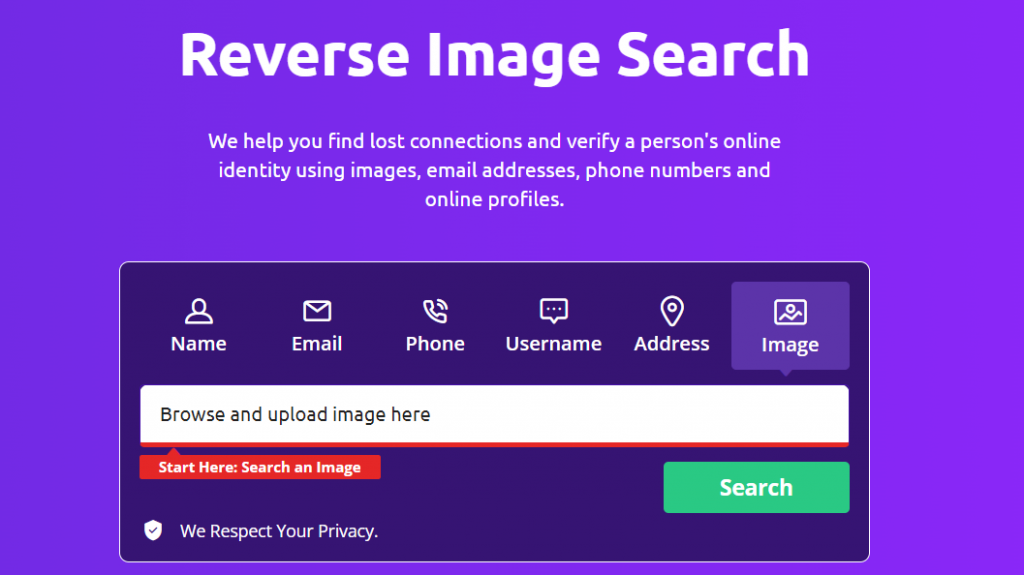
Reverse image search is a technological marvel that turns the traditional search process on its head. Instead of relying on keywords, it enables you to use images as your search query. Here are the fundamental principles that underpin the art of reverse image search:
- Image as a Query: In traditional searches, you type words or phrases to find relevant results. Reverse image search, however, uses an image as your query. You provide the search engine with an image, and it scours the web to find where that image appears.
- Visual Recognition: At the heart of reverse image search lies visual recognition technology. It analyzes the content and features within an image, breaking it down into data points. These data points are then compared to a vast database of indexed images to find matches.
- Matching Algorithms: The algorithms used in reverse image search are designed to identify similarities between your uploaded image and the images found online. They consider various factors, including colors, shapes, patterns, and objects within the image.
- Search Engines and Tools: Multiple search engines and online tools offer reverse image search capabilities. Some of the most popular options include Google Images, TinEye, and specialized reverse image search websites. These platforms allow you to upload an image and initiate a search.
- Versatility: Reverse image search isn’t limited to one type of query. You can use it to find visually similar images, locate the original source of an image, and discover related web pages where the image is embedded. It also helps identify objects, people, and landmarks within a picture.
- Verification and Fact-Checking: One of the primary uses of reverse image search is to verify the authenticity of images. It’s a powerful tool for fact-checking and confirming the accuracy of visual content, which is crucial in today’s age of digital information.
- Privacy Considerations: When you upload an image for reverse image search, it’s essential to be mindful of privacy. The search engines and tools you use will have access to the image, so ensure that you’re comfortable with their privacy policies and data handling practices.
How to Perform a Reverse Image Search
Performing a reverse image search is a relatively straightforward process, and several tools and search engines make it accessible to anyone. Here’s a step-by-step guide on how to conduct a reverse image search:
Step 1: Choose Your Tool
- Decide which reverse image search tool or search engine you want to use. Some of the most popular options include Google Images, TinEye, and specialized reverse image search websites. You can access these platforms through your web browser.
Step 2: Upload the Image
- Once you’ve chosen your tool, visit the respective website or platform. Look for an option to upload an image, which is typically represented by an icon that resembles a camera or an image frame. Click on this icon.
Step 3: Upload or Paste the Image URL
- There are two ways to provide the image for the search:
- Upload an Image: You can either drag and drop an image from your computer into the designated area or use the platform’s file upload feature to select the image from your device.
- Paste Image URL: If the image is already hosted online, you can right-click on the image, select “Copy Image Address” (or a similar option), and paste the URL into the provided field on the reverse image search tool.
Step 4: Initiate the Search
- After uploading the image or pasting the URL, click the “Search” or “Find” button. The reverse image search tool will then begin scanning the web for matches and visually similar images.
Step 5: Review the Results
- Once the search is complete, you’ll be presented with a list of results. These may include websites where the image appears, visually similar images, and related content.
Step 6: Analyze the Information
- Review the search results to gather information about the image. You can click on the search results to view the context in which the image is used and discover its origins.
Step 7: Refine Your Search (Optional)
- If you’re looking for more specific information, consider refining your search. You can use keywords or additional context to narrow down the results.
Tools and Techniques for Effective Image Search
Search Engines
Utilize popular search engines like Google Images, Bing Images, and Yahoo Image Search. These platforms have vast databases and advanced algorithms that can help you find images and their sources.
Reverse Image Search Engines
Specialized reverse image search engines such as TinEye and Yandex.Images are designed exclusively for conducting reverse image searches. They often provide more in-depth results and have their own databases.
Browser Extensions
Consider using browser extensions like “Search by Image” for Google Chrome or “Search Image” for Mozilla Firefox. These extensions allow you to initiate reverse image searches directly from your browser by right-clicking on an image.
Mobile Apps
Many reverse image search engines offer mobile apps that enable you to perform image searches from your smartphone or tablet. This is especially useful when you encounter images on the go.
Image Tracking Services
Image tracking services like Pixsy and ImageRights are invaluable for photographers and content creators. They monitor the usage of your images across the web, helping you protect your intellectual property.
Advanced Search Techniques
Use specific search techniques to refine your results. For example, you can add keywords to your image search to focus on a particular aspect of the image or its context.
Filter by Usage Rights
If you plan to use images for commercial purposes or need images with specific usage rights, many search engines offer filters that allow you to narrow down your search based on usage rights.
Reverse Image Search by Browser
Some web browsers offer built-in reverse image search functionality. For example, Google Chrome allows you to right-click on an image and select “Search Google for Image.”
Verification Tools
To verify the authenticity of an image, tools like Forensically and FotoForensics analyze the digital footprint of an image to detect alterations and edits.
Metadata Examination
For professional image searches, inspect the metadata of images. Exif data, which is embedded in many images, can provide information about the camera used, location, and editing history.
Cloud-Based Services
Consider cloud-based image search services that offer image recognition and object identification. These services can recognize objects within an image and provide related information.
Common Use Cases for Searching Someone by Picture
Searching someone by picture can serve various purposes, from personal to professional, and can be a valuable tool for different scenarios. Here are some common use cases for conducting a reverse image search:
1. Online Dating Verification: In the world of online dating, trust and authenticity are essential. Many individuals use reverse image search to verify the identity of someone they’ve connected with online, ensuring that the images match the person behind the profile.
2. Catfish Detection: Online impersonation, commonly known as “catfishing,” is a widespread concern. People use reverse image search to uncover instances of impersonation, revealing false identities and protecting themselves from fraudulent online relationships.
3. Reconnecting with Lost Contacts: Sometimes, a single image can spark memories and connections from the past. Reverse image search can help you track down long-lost friends or acquaintances by searching for images that feature them.
4. Authenticity Verification: It’s not uncommon for images to be shared without proper attribution or context. People use reverse image search to verify the authenticity of images, ensuring that they are not manipulated or misused.
5. Fact-Checking and Verification: Journalists and researchers rely on reverse image search to verify the accuracy of visual content used in news articles, reports, and academic papers.
6. Intellectual Property Protection: Photographers and content creators often use reverse image search to monitor the usage of their images and ensure that they are not used without permission or proper attribution.
7. Background Checks: Employers may use reverse image search as part of background checks for potential employees, ensuring that the information provided aligns with the person’s online presence.
8. Identifying Objects and Locations: Reverse image search can be used to identify objects, landmarks, or locations within an image. This is helpful for travelers or individuals seeking information about an unfamiliar place or object.
9. Tracking Image Usage: Businesses and brands use reverse image search to monitor the usage of their visual content and identify instances of unauthorized or misleading use.
11. Learning and Curiosity: Reverse image search can be a tool for satisfying curiosity and expanding one’s knowledge. It allows people to learn more about the world and the visual content they encounter.
Protecting Your Visual Identity During Image Searches
Protecting your visual identity during image searches involves a series of prudent measures. First and foremost, it’s essential to review and adjust your privacy settings on social media platforms and image-sharing websites. By carefully assessing these settings, you can control who has access to and can view your images, thereby enhancing your online privacy. Limiting visibility to trusted friends or followers adds an extra layer of protection.
Additionally, exercising caution when sharing images is crucial. Avoid including personal details like your precise location, home address, or any sensitive information in image captions or metadata. It’s important to remember that metadata can reveal valuable information, so refraining from such disclosures is a prudent practice.
Vigilance extends to the permissions you grant to apps and services that access your images. Many applications request broad access, including your photo library. To protect your visual identity, scrutinize these permissions, and grant only the access necessary for the app’s intended function.
For content creators, photographers, and artists, watermarking images is a valuable strategy. Watermarks serve as a visual signature, making it more challenging for others to misuse your work without proper attribution.
Lastly, understanding copyright and intellectual property rights is paramount, particularly for businesses and professionals. It’s essential to monitor the usage of your visual content online and take appropriate action against any unauthorized or improper usage. By implementing these practices, you can effectively safeguard your visual identity during image searches, ensuring that your online presence remains secure and your images are used responsibly.
The Future of Image Search: What Lies Ahead
The future of image search holds exciting prospects as technology continues to advance. Visual search is poised to become even more intuitive and integrated into our daily lives. Enhanced artificial intelligence and machine learning algorithms will enable search engines to understand images with greater accuracy, making it easier to find information about objects, landmarks, and even complex scenes.
Augmented reality (AR) and virtual reality (VR) applications are likely to incorporate image search, allowing users to explore their surroundings and receive instant information about what they see. The future may also bring innovations in real-time image translation, making foreign language signs and text instantly comprehensible through image-based search.
Additionally, image recognition and search will play a pivotal role in e-commerce, with consumers being able to search for products simply by taking a picture. This will revolutionize the way we shop online and make product discovery more intuitive.
As the internet continues to be flooded with images, the future of image search will prioritize visual content, making it a pivotal tool for information retrieval, commerce, and exploration. With ongoing advancements in technology, the possibilities for the future of image search are limitless.











