

 Multiple Faces Detected


 April 23rd, 2026
Ever wonder who’s behind a mysterious Snapchat username? Maybe you got a friend request from someone you don’t recognize, or you want to verify someone’s identity before connecting. Snapchat doesn’t make it easy to search for detailed profile information, leaving you guessing about who you’re really talking to.
A reverse Snapchat username search solves this problem. By entering a username into the right tool, you can uncover the account owner’s real name, other social media profiles, and contact information, helping you verify identities, avoid catfishing, and stay safe online.
In this guide, we’ll show you how to perform a Snapchat username search and which tools deliver the most accurate results.
Ready to find out who’s behind that username? Try Social Catfish’s reverse username search to uncover the truth in seconds.
1. Find The Username Of A Friend

If you’re trying to reverse search someone on Snapchat, the first step is often simply figuring out their exact username. Unlike display names (which can be changed anytime), Snapchat usernames are unique and don’t change, so once you have one, your search becomes much easier.
Here are a few reliable ways to find a friend’s Snapchat username:
Check other social media profiles
Many people list their Snap handle in their Instagram bio, TikTok profile, X (Twitter) header, or even Facebook “About” section. Look for phrases like Snap, Snapchat, Add me on Snap, or a ghost emoji 👻.
Look at their phone contacts
If you already have their number saved, open Snapchat and enable contact syncing. Snapchat will suggest people from your contacts and often shows their exact username under their display name.
Search their name directly in Snapchat
Type their full name, nickname, or known display name into Snapchat search. If multiple results show up, profile photos, mutual friends, location clues, or Bitmoji style can help you spot the right person.
Ask mutual friends (discreetly)
If you share connections, a simple “What’s their Snap?” can save time, especially when their username isn’t obvious.
If you still can’t find it… Use Social Catfish
Sometimes people keep their Snapchat hidden or use a username that’s totally different from their real name. In that case, try looking them up through Social Catfish using whatever you do have: a phone number, email, name, or photo. Once Social Catfish surfaces related accounts or usernames tied to that identity, you can narrow in on their Snapchat handle faster and with more confidence.
Finding the right username is the key that unlocks everything else, once you have it, you can move on to verifying who’s really behind the account
2. Snapchat Username Lookup
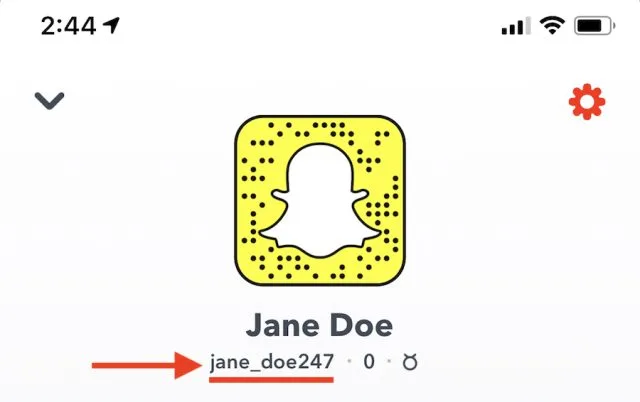
Once you’ve retrieved the username, you can type it into Google. If the person uses a different username for their other social media profiles, it will make this method much harder to yield results. For more information on this, click here.
Sometimes, however, a Snapchat username lookup free approach works because you can figure out the first and last name through the username, as it’s often a combination of their first name and last name. If you can figure it out this way, you could find yourself with results from Google or by using a Snapchat account lookup tool.
A profile picture will also help you search Snapchat username, as many people use the same picture for their different accounts.
3. Check The Username On Social Media
Again, this method doesn’t always work because, depending on the user’s privacy settings, you may or may not find their profile with a username search. However, if their profile is set to public on Facebook, Instagram, LinkedIn, Twitter, etc, a username search should provide you with some results, making it easier to gain more information about the person.
4. Snapchat Reverse Image Search
If you have the profile image of the user, you can conduct a reverse image search on Google. If you’re going to take a picture of a user’s profile on Snapchat, make sure that you’re taking a photo of the screen with another phone, because Snapchat will notify the user if you take a screenshot.
Once you’ve taken the picture, crop the user’s face, and save it to your photo gallery. From there, you can search for a Snapchat username with a reverse image search, which could show you the same picture used on different social profiles.
5. Take A Look At Their Zodiac Sign
You will find their Zodiac sign underneath their username on Snapchat. From this, you can gather an approximation of their birthday. It isn’t the most foolproof way of confirming identity, but it can be useful additional information in a Snapchat user search.
Finding out the information that you’re looking for can be time-consuming, and you can also come up empty-handed in your search. Depending on the information available, and whether or not the user’s other social media accounts are private or not will make a major difference when it comes to finding out the identity of the Snapchat user.
Snapchat Username Search: Top 5 FAQs
A reverse Snapchat lookup, also called a reverse username lookup, lets you identify who owns a specific Snapchat handle. Enter the username into a search tool to uncover the person’s real name, other social profiles, and contact information.
Yes! While Snapchat’s app only shows basic profile info, reverse username search tools like Social Catfish can reveal the account owner’s identity, associated social media accounts, phone numbers, and email addresses linked to that username.
Enter the Snapchat username into Social Catfish’s reverse username search tool. It scans comprehensive databases to find the person’s real identity, other online profiles, and contact details—all in one confidential search.
Common reasons include verifying someone’s identity before meeting them, checking if a friend request is legitimate, investigating suspicious accounts, avoiding catfishing scams, or reconnecting with someone when you only know their username. In such cases, a Snapchat lookup by username can be especially useful.
Yes, using publicly available usernames to look up Snapchat users for search purposes is legal. However, use the information responsibly; harassment or misuse of personal data could violate privacy laws or platform terms of service.
Tips for Conducting a Reverse Search
When delving into the expansive realm of Snapchat, mastering the art of reverse search, also known as Snapchat lookup, is paramount for connecting with users and discovering shared interests.
Using Third-Party Lookup Tools
The most effective way to perform a Snapchat username search without app is through specialized reverse lookup tools. Platforms like Social Catfish allow you to enter a username and instantly access comprehensive databases to find the account owner’s identity, other social profiles, and contact information.
Snapchat’s Built-In Search
While Snapchat doesn’t offer a built-in reverse lookup feature, you can try a Snapchat account information lookup using third-party tools or the app’s search bar to manually enter usernames or partial identifiers. However, privacy settings often limit what you can discover; many profiles are only visible to users who’ve exchanged mutual contact information.
Maximize Your Results
For the best results, combine multiple search methods:
- Use Social Catfish’s reverse username search for comprehensive data
- Try Snapchat’s internal search for quick username verification
- Check the person’s other social media platforms for linked accounts
Why Social Catfish Works Better
Unlike Snapchat’s limited search, Social Catfish offers a Snapchat user lookup and a Snapchat name lookup that accesses extensive databases to reveal real names, phone numbers, email addresses, and associated social profiles, even when privacy settings restrict standard searches.
Ready to identify any Snapchat user? Start your reverse username search with Social Catfish now.











