Multiple Faces Detected


 September 24th, 2023
In an age where our smartphones are central to our daily lives, they store an abundance of personal information. However, this digital treasure trove also attracts the attention of hackers and cybercriminals who seek unauthorized access to our data. One of the telltale signs of a hacked phone is unusual data usage. In this guide, we’ll delve into the intricate relationship between data usage patterns and smartphone security. By understanding the signs of excessive data consumption and how it relates to potential hacking attempts, you’ll be better equipped to protect your digital world and safeguard your personal information. Join us as we explore the subtle and not-so-subtle indicators of a compromised smartphone, ensuring that you stay one step ahead of potential security threats.
Anomalous Data Usage Patterns
Where connectivity is paramount, data usage patterns have become a crucial aspect of our smartphone experience. However, when these patterns exhibit anomalies, it can be a red flag indicating a hacked phone. This section delves into the intricate world of data usage and explores how irregular patterns can serve as a significant indicator of a compromised device. By mastering the art of monitoring your data consumption and recognizing unusual data usage, you’ll be better prepared to identify potential security breaches in real time.
Background Data Usage Activity
Delving deeper into the realm of data usage, one of the most telling signs of a hacked phone is unusual background data activity. Smartphones are designed to perform various tasks and updates in the background, ensuring a seamless user experience. However, when malicious software or unauthorized processes run surreptitiously, they can consume data without your knowledge.
- Silent Data Drain:Malicious apps or processes often work covertly, siphoning off your data in the background. This stealthy behavior is a hallmark of hacking attempts. While some legitimate apps may use background data for essential updates, monitoring these activities closely is essential.
- Identifying Rogue Apps:The first step in tackling background data usage is identifying rogue apps. Review the list of installed apps on your smartphone and scrutinize their permissions and behavior. Suspicious apps may consume data even when you’re not actively using them.
- App Permissions and Data Access:Dive into the permissions granted to your apps. Some legitimate apps may request extensive data access for legitimate purposes, but if an app seeks permissions beyond its intended function, it should raise suspicions. Limit data access for apps that don’t require it.
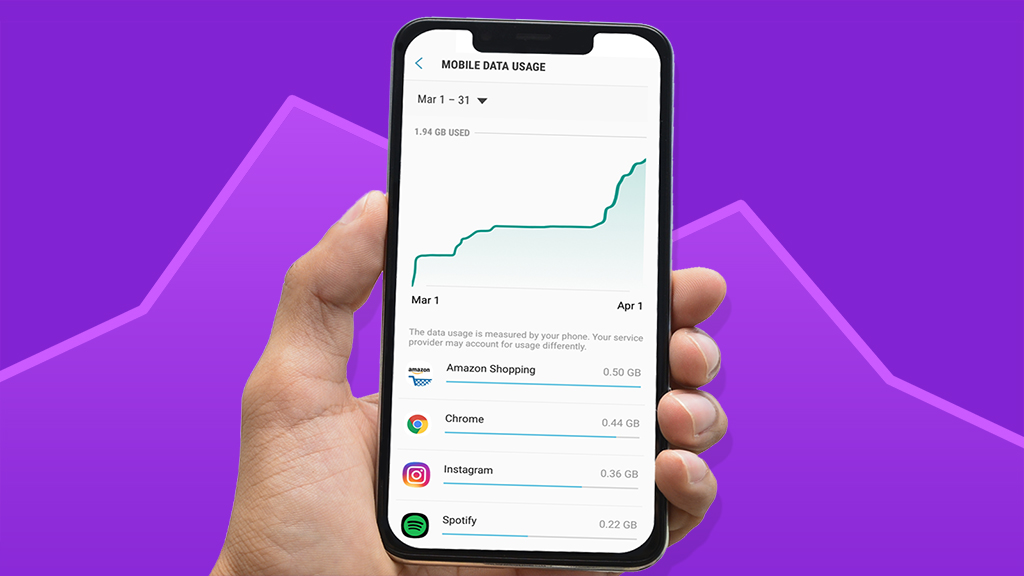
- Monitoring Data Consumption:Keeping a vigilant eye on your data consumption is crucial. Most smartphones offer tools to monitor data usage by app. If you notice that a specific app is consuming an excessive amount of data, it’s a sign to investigate further.
- Data-Hungry Background Processes:Background processes can also contribute to unusual data usage. Hacked phones may run unauthorized tasks in the background, such as sending spam or mining cryptocurrencies. Understanding how to identify and stop these processes is essential in regaining control.
- Data Usage Alerts and Notifications:Many smartphones allow you to set data usage alerts and notifications. Take advantage of these features to stay informed about your data consumption. If you receive alerts about high data usage from an app you haven’t actively used, it’s a cause for concern.
Data-Intensive Apps and Data Permissions
Apps with Excessive Data Requests
Some apps, both legitimate and malicious, have a voracious appetite for data. While certain apps genuinely require extensive data access for their intended functions, others overstep their boundaries. It’s crucial to identify and scrutinize apps that request access to data beyond what’s necessary for their operation.
Permission Overreach
App permissions determine the extent to which an app can access your smartphone’s functionalities and data. Pay close attention to the permissions requested by each app during installation or updates. If an app seeks access to features unrelated to its core function, it may be trying to exploit your data.
Controlled Data Access
Take control of app permissions by managing them in your smartphone’s settings. Modern operating systems allow you to grant or deny specific permissions on a per-app basis. Review and adjust these permissions to restrict access to sensitive data, enhancing your smartphone’s security.
Monitoring App Behavior
Regularly monitor the behavior of your apps, especially those that are data-intensive. Keep an eye on their data usage patterns and any unusual activities. If an app continues to access data without justification, it’s a signal to investigate further.
App Source Verification
Ensure that you download apps only from reputable sources, such as official app stores. Third-party app repositories may host malicious apps that masquerade as legitimate ones. Downloading apps from trusted sources reduces the risk of installing potentially harmful software.
Data Permission Audits
Conduct periodic audits of app permissions on your smartphone. As your app ecosystem evolves, so do their permissions. Regularly review and adjust permissions to align with your privacy preferences and minimize the risk of data misuse.
Protective Measures for Data Usage Security:
Many smartphones allow you to set data usage alerts and caps. Take advantage of these features to monitor your data consumption actively. By setting a data usage cap slightly below your plan’s limit, you can prevent unexpected overages and detect unusual data usage patterns promptly.
Conduct regular audits of the apps installed on your smartphone. Review their permissions, data access, and recent activities. Remove any apps that you no longer use or those that exhibit suspicious behavior. Maintaining a lean and secure app ecosystem is key to data usage security.
Explore your smartphone’s built-in data-saving features. These features can help you conserve data by compressing images, restricting background data, and optimizing your browsing experience. Enabling these settings can reduce data consumption while enhancing your device’s security.
Consider using a Virtual Private Network (VPN) to encrypt your data traffic and protect your online activities. A VPN adds an extra layer of security by concealing your IP address and making it difficult for hackers to intercept your data.
Install reputable security software or mobile antivirus apps to keep your smartphone protected against malware and potential threats. Ensure that both your smartphone’s operating system and apps are regularly updated with the latest security patches.
Knowledge is your best defense against hacking attempts. Stay informed about the latest hacking techniques and common pitfalls. Educate yourself and your peers about cybersecurity best practices, including how to identify and address unusual data usage patterns.